


Have you ever considered how some websites rank higher than others, given that they share similar content? The reason often comes down to details, such as how they optimize their images. Yep, those images that help support your content can also help your SEO when optimized properly.
When I first started building websites, I paid zero attention to image optimization. I would upload high-resolution photos straight from my camera, name them something like “DSC1234.jpg,” and call it a day. I had no idea I was throwing away a massive opportunity to create value and increase my website’s visibility and performance.
You May Also Like

Image SEO is the hidden gem of search engine optimization – it’s notable but often ignored. In this guide, we will go through optimizing images to rank in search engines specifically. Our guide will focus on beginners with a step-by-step approach to making image SEO easy to implement, whether building a new website or optimizing a current one.
By the end, you will have the knowledge and tools to make your images work harder for your SEO.
Understanding Image SEO Fundamentals
What Is Image SEO and Why Does It Matter
At its essence, image SEO is simply optimizing the images on your site to show higher in search results. It’s not just about images that are tied to a pretty story, but also about making those images understandable to search engines and viewers better on the front end.
To understand this more clearly, think of search engines as the most literal people possible when they visit your site. But they can’t see your images, the way humans do (this could be evolving as things like AI catch on).
They need to rely on clues, like filenames, alt texts, and context, to know what your images are about. If you provide the right clues to search engines, you will make it much easier for them to index your images correctly and put them on relevant search engine results pages (SERPs).
But why should you care about this as an SEO beginner? Consider these benefits:
- Higher visibility in both traditional and image search results
- Improved website accessibility for users with visual impairments
- Faster page loading times (properly optimized images are smaller)
- Enhanced user experience, which leads to longer site visits
- Better conversion rates as users engage more with visual content
Search Engine Rankings
Image optimization affects several key factors search engines use to rank your site.
Page speed is the biggest of these factors. Big, unoptimised images are often the reason for slow loading sites. According to Google, 53% of mobile site visitors will abandon a page that takes more than 3 seconds to load. By compressing your images and serving them in the right formats and sizes, you can make a huge difference to loading times.
Here’s a real life example from my experience: A photography portfolio site I worked on had beautiful but massive images that made the site load in a painful 8.2 seconds. After implementing image optimisation techniques we reduced the load time to 2.4 seconds and saw a 17% increase in pages per visit and 23% decrease in bounce rate.
Beyond speed, optimised images contribute to your overall content quality. Search engines like Google evaluate content comprehensiveness and quality when ranking pages. Relevant, optimised images tell search engines your content is thorough and valuable, which could boost your rankings for target keywords.
The Value of Google Image Search
Don’t underestimate Google Images as a source of traffic. Images are known to be returned in about 36.7% of search queries, so you can see that if you get traffic from Images, the opportunity for traffic is high. Visual search is becoming more important in some industries every day.
If you exist in an e-commerce business, fashion, food, travel, or design, visual search is a potential win for qualified traffic. Google has said that 50% of online shoppers say that images helped them decide what to buy. I have seen this first-hand with a home decor client whose product image rankings started improving in Google Images after I optimized the images.
Visitors who came from image search also had a 27% higher conversion rate than the average visitor to the site; they came with visual intent and were far more predisposed to purchase. When you are optimizing for Google Images, keep in mind that Google Images is looking for high-quality, relevant images to the user’s search query.
The closer you can align your image optimization with the user’s search intent, the greater the likelihood your images will appear in these search results.
Essential Image SEO Best Practices
Choosing the Right Image Formats
Not all image formats are created equal. The right format for each use case is crucial for good image SEO. JPEG (or JPG) is great for photos and images with gradients.
Since it’s a lossy compression format you can compress the file down to a reasonable size while retaining acceptable quality. I use JPEG or webp for the feature image in blog posts, product photos and any other photographic images where I’m sacrificing acceptable quality for better performance. PNG should be your go to when you need transparency, text, logos or crisp edges but especially for any kind of graphic.
PNGs are generally bigger than JPEGs but can maintain perfect quality with lossless compression. I use PNGs when I want to use a logo or illustrations (e.g. horizontal text and images), screenshots and for any image with a transparent background.
WebP is the next generation of image formats, offering better compression and quality than traditional formats. In my experience converting images to WebP can reduce file size by 25-35% without any quality loss. Most modern browsers now support WebP so it’s a great choice for your site.
AVIF is the new kid on the block, offering even better compression than WebP (around 50% smaller than JPEG). While browser support is still growing, implementing AVIF with proper fallbacks can give you an edge in page speed optimization.
Here’s my practical rule of thumb for beginners:
- Photographs and complex images → JPEG
- Graphics with transparency or text → PNG
- Progressive enhancement → Use WebP with JPEG/PNG fallbacks
Optimizing File Names and Alt Text
ISo you’re showing someone a photo on your phone. You’d say “This is my dog Max playing at the beach,” not “IMG_4567”. Search engines need similar context, which is why descriptive file names and alt text are key.
When naming image files, be specific and include relevant keywords naturally. Instead of “photo1.jpg”, use “chocolate-chip-cookie-recipe.jpg”. This helps search engines understand the image content before they even process the image itself.
A few best practices for file naming:
- Use lowercase letters and hyphens instead of spaces
- Keep names reasonably short but descriptive
- Include primary keywords when relevant
- Be specific about what the image shows
Alt text (alternative text) is even more important. Originally designed as an accessibility feature for visually impaired users, alt text has become a SEO element. Well crafted alt text helps search engines understand image content and makes your site more accessible.
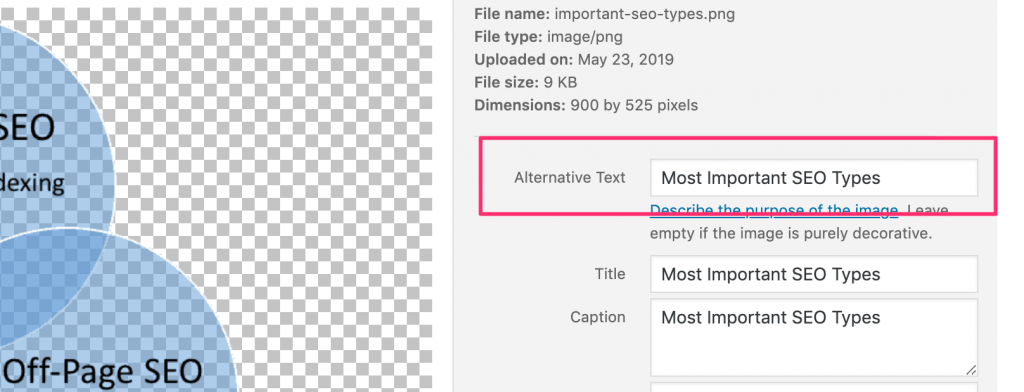
When writing alt text:
- Be concise but descriptive (aim for 125 characters or less)
- Include keywords naturally, not forcefully
- Describe what’s in the image accurately
- For decorative images, use empty alt text (alt=””)
Let me share a real example. For an image of a red mountain bike on a forest trail, weak alt text would be “bike” or “mountain bike image.” Strong alt text would be “Red mountain bike on forest trail in Pacific Northwest.”
Implementing good file naming and alt text practices can feel tedious, especially when dealing with many images, but the SEO benefits make it worthwhile. I’ve seen significant ranking improvements for clients simply by auditing and optimizing these two elements across their sites.
Image Compression and Loading Speed
The most technical part of image SEO is compression and size optimization. Large images are the number one cause of slow loading websites and page speed is both a ranking factor and user experience.
Before uploading any image to your website, compress it to reduce file size while keeping quality acceptable. There are many great tools to do this:
- TinyPNG/TinyJPG: Easy online tool that reduces file size big time
- ImageOptim: Free desktop app for Mac that removes unnecessary metadata
- Squoosh: Google’s tool with advanced compression options
- ShortPixel: WordPress plugin that optimizes images on upload
Beyond compression, pay attention to image dimensions. I see beginners uploading 4000×3000 pixel images when they only need an 800×600 pixel display size. This forces browsers to resize images on the fly, wasting bandwidth and processing power. Instead, resize images to the dimensions they’ll be displayed at before uploading.
Lazy loading is another technique I highly recommend. This delays loading images until they’re about to enter the viewport, prioritizing content the user can see immediately. Most modern content management systems have lazy loading as a built-in feature or through plugins.
I worked with an e-commerce website that cut its page load time in half by implementing proper image compression, resizing and lazy loading. Their mobile conversion rate increased by 22% as a result – a direct correlation between image optimization and business results.
Remember: every second counts in page loading time. Research shows conversion rates drop by 4.42% for each additional second of load time, making image optimization not just an SEO issue but a business performance problem. Advanced Image Optimization Techniques
Structured Data and Image Sitemaps
Now that you have your basic image SEO content, it’s time to take it to the next level with structured data and image sitemaps. These technical bits will help search engines understand and index your images.
Structured data, also known as schema or schema markup, gives search engines precise context around your images. Image schema lets you tell search engines what your images are about, who the creator is and how it relate to the content. For example, the ImageObject schema lets you include image dimensions, captions and even attribution.
Product schema lets you use multiple images for one product with all the details. Recipe schema lets you highlight the main image of your food creations. All this extra context means your images are more likely to show up in rich results and other featured listings.
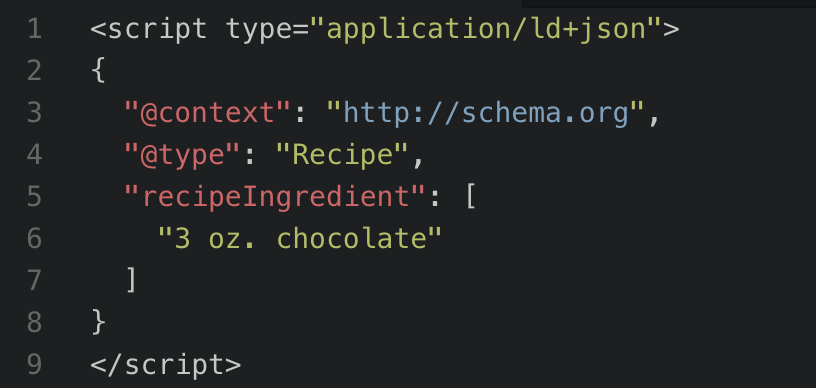
I have seen recipe sites double their click through rates when they did the image schema implementation correctly and their images show up in search results with ratings and cooking times.
Image sitemaps complement your regular XML sitemap by providing extra information about your images. They are particularly useful for images that are hard for search engines to find, like images loaded through JavaScript or behind carousels.
An image sitemap includes the image URL, caption, title, license information and geographic location when relevant. Creating one might sound technical but most SEO plugins for popular CMS platforms can do image sitemaps for you.
Responsive Images and Mobile Optimization
With Google’s mobile-first indexing, optimizing images for mobile devices isn’t optional—it’s essential. Mobile users often have slower connections and limited data plans, making image optimization even more critical.
Implementing responsive images ensures that users receive appropriately sized images based on their device and screen size. This is achieved through HTML features like the srcset attribute, which allows you to specify multiple image versions at different resolutions.
Here’s a simple example of responsive image implementation:
<img srcset="https://cdn.nfinitelimits.com/small-image.jpg 400w, https://cdn.nfinitelimits.com/medium-image.jpg 800w, https://cdn.nfinitelimits.com/large-image.jpg 1200w" sizes="(max-width: 600px) 400px, (max-width: 1200px) 800px, 1200px" src="fallback-image.jpg" alt="Descriptive alt text">This code tells browsers to select the appropriate image based on both the device width and display resolution, ensuring optimal performance across devices.
Beyond responsive images, consider these mobile optimization best practices:
- Prioritize “above the fold” images to load first
- Consider removing non-essential images on mobile versions
- Test your mobile page speed regularly using Google’s tools
- Optimize for Core Web Vitals metrics, particularly LCP (Largest Contentful Paint)
Modern Image SEO Tools
AI Image Optimization
Artificial intelligence is making image SEO more effective and faster.
Modern AI-powered tools can auto-generate alt text from image content. While these shouldn’t replace human-written alt text for critical images, they can be super helpful for bulk optimizing large image libraries. Services like Microsoft Azure’s Computer Vision API and Google’s Cloud Vision API can detect objects, scenes and even emotions in images.
AI compression tools go beyond traditional compression by analyzing image content to determine where compression can be applied with minimal visual impact. Tools like Cloudinary, ImageKit, and TinyPNG Pro use machine learning to optimize images more intelligently than traditional methods.
Format selection is another area where AI is making progress. Smart CDNs can now auto serve the optimal image format based on the user’s browser capabilities, serving WebP to Chrome users and falling back to JPEG for browsers without WebP support.
Monitoring and Measuring Image SEO
As with all SEO, measuring the impact of your image optimization is key.
Google Search Console provides valuable insights into how your images perform in search results. The “Search Appearance” filter lets you isolate image search performance, showing impressions, clicks, and click through rate for your images. Pay attention to which images get the most traffic and what queries they rank for.
Page speed monitoring is another important part of image SEO measurement. Tools like Google PageSpeed Insights, GTmetrix and WebPageTest can identify image related performance issues and suggest specific optimizations.
Core Web Vitals metrics, especially Largest Contentful Paint (LCP) and Cumulative Layout Shift (CLS) are directly affected by image optimization. LCP measures how long it takes for the largest content element (often an image) to load, while CLS tracks unexpected layout shifts, often caused by images loading without defined dimensions.
I recommend creating a regular image SEO audit process:
- Monthly image search performance review in Google Search Console
- Bi-weekly page speed test of key landing pages
- Quarterly image optimization audit of your site
By consistently monitoring these metrics, you can identify opportunities for improvement and assess the impact of your optimization efforts.
Ready to Make SEO Pay for Itself?
Stop paying for promises – start paying for performance. Our experts will revolutionize your search visibility with no upfront costs.
Common Image SEO Mistakes to Avoid
Even experienced webmasters make these common technical mistakes with image SEO. Avoiding them will put you ahead of many competitors.
Neglecting to specify image dimensions in HTML or CSS is a frequent error that leads to layout shifts as images load. Always include width and height attributes in your image tags to reserve space for images during page loading:
<img src="example.jpg" width="800" height="600" alt="Example image">Using the wrong image format for the content type is another common mistake. I once audited a site that used PNG for all their blog images and the files were 3-4 times larger than they needed to be. Converting those to JPEG reduced their average page size by 60%.
Not caching images for browsers forces returning visitors to download the same images over and over. Proper image cache headers can make a big difference for repeat visitors.
Not including alt text at all is still surprisingly common. I audited 100 e-commerce sites recently and found 34% had many images with no alt attributes. This hurts SEO and creates accessibility issues for screen readers.
Image SEO Trends
Next-Generation Image Formats
The image format landscape continues to evolve rapidly, with new formats offering superior compression and quality.
WebP has now achieved near-universal browser support, making it a safe choice for primary image delivery. Converting your image library to WebP with appropriate fallbacks can yield significant performance improvements. I’ve consistently seen 25-30% file size reductions compared to optimized JPEG files without visible quality loss.
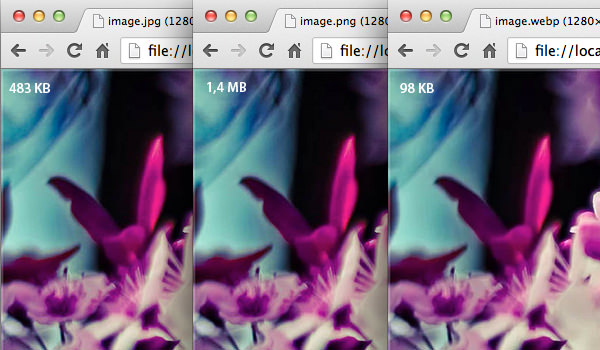
AVIF represents the next frontier in image optimization, offering approximately 50% smaller file sizes than JPEG with equal or better quality. While browser support is still growing (Chrome, Firefox, and Opera currently support it), implementing AVIF with proper fallbacks puts you ahead of the curve in performance optimization.
Responsive image delivery has been enhanced by the <picture> element, which allows for art direction (showing different image crops or compositions based on screen size) in addition to resolution switching. This gives designers more control while maintaining performance:
<picture> <source media="(max-width: 600px)" srcset="https://cdn.nfinitelimits.com/mobile-image.jpg"> <source media="(max-width: 1200px)" srcset="https://cdn.nfinitelimits.com/tablet-image.jpg"> <img src="desktop-image.jpg" alt="Description of image"></picture>Visual Search and AI Recognition
Visual search is the most exciting part of image SEO and will have a lasting impact on how we can optimize our images.
Google Lens is processing billions of visual searches a month, and now users can search with their camera or an existing photo instead of just text. So we need to optimize for textual relevance and visual relevance, and object recognition.
Pinterest has gone through a similar evolution with its visual search capabilities, with the Lens feature allowing users to discover products and ideas based on images. This could mean a lot of qualified traffic from an image that is properly optimized using Pinterest’s visual algorithm, especially for e-commerce and lifestyle brands.
AI image recognition software is advancing fast, and search engines are looking at what else is in the image, not just textual cues. This doesn’t mean we have a free pass to not optimize images the “old way” but reinforces the need to use relevant high quality images that accurately represent what you are covering.
To prepare for this visual search future:
- Ensure images show your products/subjects without clutter
- Use multiple angles for product images
- Maintain consistent lighting and professional quality
- Include images that match common visual search use cases in your industry
Image SEO is one of the most overlooked yet most valuable optimization opportunities. By following the steps in this guide—from file naming and compression to structured data and next-gen formats—you can improve your site’s performance, visibility and user experience. If your agency isn’t doing this, we suggest finding a new one! Contact us, or check out DesignRush’s post on how to find the best agency for your marketing needs.
Remember, image optimization is more than just the technical execution, it’s about improving the way users and search engines experience your images. Each image you optimize correctly improves in many ways, including page load speed, site accessibility, context for search engines, and overall experience for your visitors.