


Remember when tracking a simple form submission was a big win? Those days are behind us. As a digital analyst who’s been through the transition from Universal Analytics to GA4 conversions, I can tell you that understanding key events isn’t just a technical requirement—it’s the foundation of making data-driven decisions that actually impact your bottom line.
G4A Conversion Events vs Regular Events
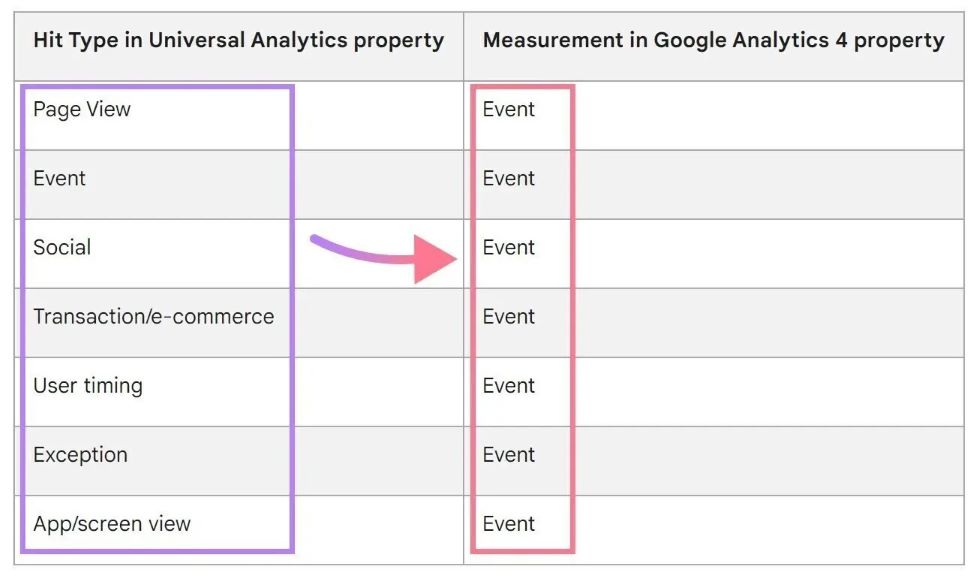
GA4’s approach to conversion tracking is a fundamental shift from Universal Analytics. Instead of setting up separate “goals,” you’re now designating specific events as “key events” (sometimes still called conversions or a conversion report). This isn’t just a terminology change—Google recognizes that user journeys have become more complex across multiple platforms and sessions.
You May Also Like

The beauty of key events is their flexibility. Unlike the four goal types in Universal Analytics, almost any action can be a key event in GA4. But this freedom comes with responsibility – not every button click deserves this status. I recommend clients reserve key event designations for actions that directly correlate with business outcomes.
GA4 automatically collects some events (page_view, session_start, etc.), but the real power comes when strategically upgrading specific custom events to key event status. For example, at my agency, we recently helped a SaaS client distinguish between generic “form_submit” events and more valuable “demo_request” submissions, improving their lead quality measurement dramatically.
Ready to Make SEO Pay for Itself?
Stop paying for promises – start paying for performance. Our experts will revolutionize your search visibility with no upfront costs.
Strategic Implementation Framework
Technical Setup:
Marking events as conversions in GA4 is super easy—just toggle the “Mark as conversion” option in the Events tab. But don’t be fooled. The real complexity is in making sure events fire consistently and capture the right parameters.
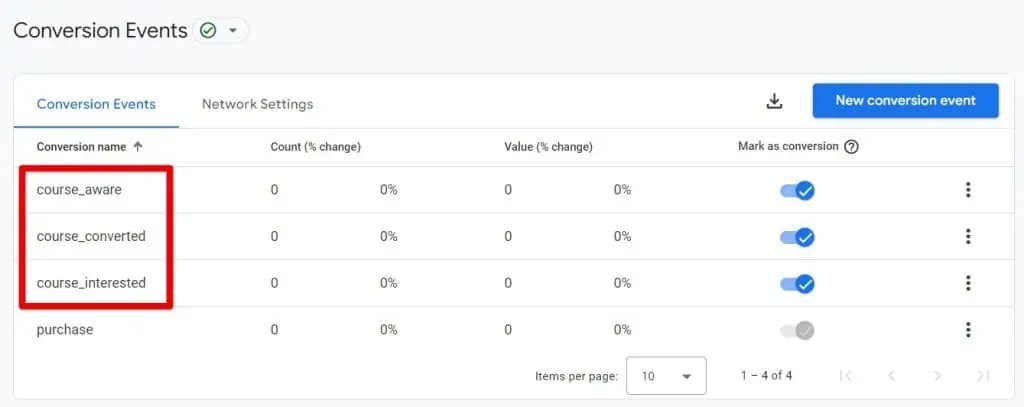
For clients using Google Tag Manager, I recommend a hybrid approach: use enhanced measurement for standard interactions and custom triggers for business specific actions. I recently helped an e-commerce client set up purchase event tracking that captured not just transaction values but also product categories and customer segments so we could do much more analysis.
For advanced tracking needs, don’t forget about GA4’s measurement protocol. This is a powerful tool that allows server-side tracking of events that can’t be tracked client-side. I’ve used this to track subscription renewals processed through backend systems so we could see the full customer lifecycle.
Essential Tracking Archetypes
Revenue Drivers:
For e-commerce businesses, the purchase event reigns supreme, but tracking the full funnel provides invaluable insights. Beyond the obvious purchase completion, consider tracking:
- Add to cart → View cart → Initiate checkout
- Add payment info → Shipping selection → Order review
- Promo code application (success/failure)
Subscription businesses require a different approach focused on customer lifetime value. Key events should track the entire customer journey:
- Trial signups and activations
- Upgrade or downgrade events
- Renewal notifications and responses
- Churn signals (failed payments, cancellation page visits)
Lead Generation:
Not all form submissions are created equal. I worked with a B2B tech company that doubled its marketing efficiency by segmenting form types. A demo request was worth 5x a whitepaper download, so they could optimize for quality over quantity.
Beyond forms, tracking engagement with CTAs provides context. Consider a tiered approach where scroll depth, click patterns, and page-level engagement all contribute to understanding user intent before the conversion happens.
UX Signals:
Media engagement metrics can tell you how effective your content is. Instead of just tracking video starts, implement progress markers (25%, 50%, 75%, 100%) to see how users consume your content. One media client found that their optimal video length was 40% shorter than what they’d been producing after looking at completion rates.
Error tracking is often overlooked but provides huge optimization opportunities. Form abandonment, 404s, and validation failures are all friction points where conversions are lost. By marking these as events (not necessarily key events), you create opportunities to intervene.
Advanced Integration Techniques
The real power of GA4 emerges when integrated with other platforms. With Google Ads, your key events can drive automated bidding strategies, particularly when you include value parameters. This creates a feedback loop where your highest-value conversions automatically receive budget priority.
Cross-platform tracking becomes increasingly important as user journeys span multiple devices and environments. The Firebase integration for mobile apps allows you to track conversions that begin on the web and complete in-app (or vice versa), providing a holistic view of the customer journey.
Optimization Workflows
GA4’s Exploration Hub has some amazing funnel analysis tools. I use the funnel exploration technique to find where users are dropping off conversion paths. Recently, this helped a client discover that international users were dropping off at shipping selection, so we improved the UX and saw 22% more global conversions.
Value optimization goes beyond just counting conversions. By parametrizing your key events with values—whether actual revenue, expected deal size, or lead scores—you turn GA4 into a business intelligence platform. So you can optimize for revenue impact, not just conversion volume.
Enterprise-Grade Troubleshooting
Data quality is non-negotiable for good decision making. Implement a validation workflow that includes GTM debugger verification and GA4 DebugView confirmation before you go live. For large implementations, I recommend creating a test property that mirrors your production setup but allows you to test without contaminating your main dataset.
With increasing privacy regulations, compliance optimization must be baked into your tracking strategy. Proper consent mode implementation ensures you’re capturing data only from users who have given consent and maintaining aggregate insights for those who haven’t.
Performance Mastery Techniques
GA4 attribution modeling has evolved to give us more ways to understand conversion paths. I’ve helped clients move beyond last-click models to data-driven attribution that mirrors the complex customer journey for considered purchases with long decision cycles.
Most exciting of all is GA4’s predictive capabilities. By identifying users with high purchase probability or high churn risk, you can take action before the conversion event occurs or is lost. That’s proactive, the hallmark of analytics maturity.
Remember, mastering GA4 key events isn’t just about technical implementation—it’s about creating a framework that connects user behavior to business outcomes. When done right, your analytics don’t just tell you what happened—they tell you what to do next.
Sources:
- Analytics Mania: Track Key Events with Google Analytics 4
- Accelerated Digital Media: Why Did Google Analytics Change Conversions to “Key Events”
- OneNine: How to Set Up Google Analytics Conversion Tracking
- DataFeedWatch: How to Track Conversions in Google Analytics 4
- Adswerve: Google Ads & GA4 Conversions – Best Practices