


I’ve been in the SEO trenches for years, and if there’s one thing I’ve learned, it’s that the right tools can make all the difference between hours of tedious work and streamlined efficiency. Free SEO Chrome extensions have revolutionized how I approach SEO tasks daily. They’re like having a Swiss Army knife right in your browser, always ready when you need to analyze a competitor, check keyword metrics, or audit a site on the fly. It’s also useful to get an idea when visiting sites you regularly browse.
The best part? Many powerful SEO extensions are completely free. After testing dozens over the years, I’ve compiled what I consider the essential Chrome extensions that every SEO professional should have in their arsenal. Let me walk you through the tools that have saved me countless hours and helped deliver impressive results for my clients.
Free Keyword Research & Analysis Chrome Extensions
You May Also Like

Every solid SEO strategy begins with thorough keyword research and some form of SEO Reports. The right keywords connect your content with your audience’s search intent, and these extensions make finding those perfect keywords much easier.
Essential Keyword Research Tools
- Keyword Surfer: The Surfer SEO free extension has become my go-to tool for quick keyword insights. Just type a search query into Google, and Keyword Surfer displays search volume data right in the SERP. What I love most is how it suggests related keywords in the sidebar along with their volumes. Last month, while researching content for a fitness client, I discovered three low-competition keywords with decent volume that competitors had completely overlooked.
- Ubersuggest: While Neil Patel’s Ubersuggest has a comprehensive paid tool, the Chrome extension offers valuable free features. It provides keyword difficulty scores and CPC data that help me determine which keywords are worth targeting. The competition analysis feature has been particularly useful for understanding what we’re up against before diving into a new niche.
- SEOquake: An oldie but goodie in my toolkit. The detailed SERP metrics help me evaluate keyword competitiveness instantly. The CSV export function has saved me hours when compiling keyword reports for clients. When working with an e-commerce client recently, I exported metrics for over 50 product-related keywords in minutes—a task that would have taken hours manually.
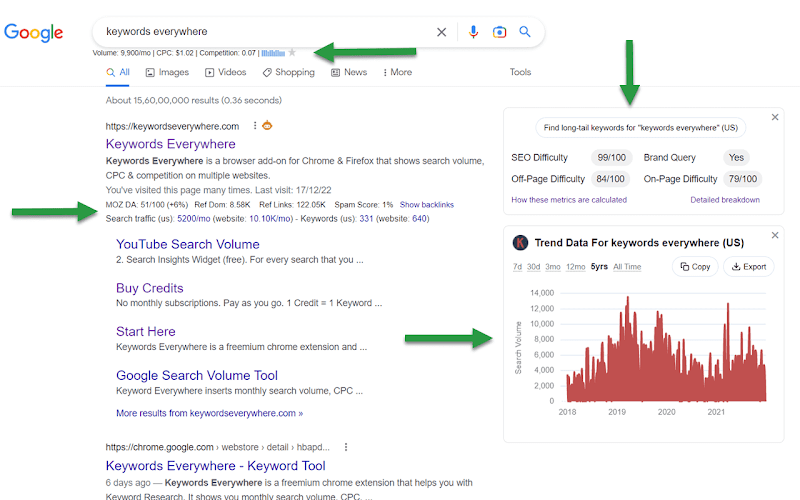
- Keywords Everywhere: The trend charts feature has become indispensable for identifying seasonal keywords. For a holiday decoration site, I used Keywords Everywhere to map out an entire year of content based on search trend patterns, resulting in a 43% increase in organic traffic during peak seasons.
- SEO Search Simulator: The SEO Search Simulator, created built by Nightwatch, is a popular, free Chrome browser extension designed for SEO professionals and website owners to check unbiased local search engine rank positions. It works by stripping away personalization, browsing history, and cookies while allowing users to specify a target country, city, or language to perform search queries.
Technical SEO Audits & On-Page Optimization
Technical SEO can be daunting, but these extensions simplify the process of identifying and fixing issues that might be holding your site back from ranking higher.
Core Technical Extensions
- SEO Minion: This powerhouse has saved me from embarrassing oversights more times than I can count. Its broken-link checker is lightning-fast, and the hreflang validation feature is essential for international sites. Just last week, it helped me identify inconsistent hreflang tags across a client’s Spanish and English pages that were causing ranking issues in Mexico.
- Lighthouse: Google’s own Lighthouse extension has become central to my technical audit process. The comprehensive performance reports make it easy to explain technical issues to clients who aren’t SEO-savvy. I particularly value the accessibility checks, which not only improve SEO but also make sites more inclusive—something more clients are prioritizing now.
- Detailed SEO Extension/Meta SEO Inspector: I toggle between these two depending on the task. Both excel at quick meta tag analysis and schema validation. The visual hierarchy of header tags in Detailed SEO Extension makes it easy to spot structural issues that might confuse both users and search engines.
- Check My Links: Simple but powerful. Before submitting any new content, I run Check My Links to ensure all references are working. It has caught broken links on nearly every major content project I’ve worked on, saving potential credibility damage and lost ranking opportunities.
SERP Analysis & Competitor Tracking
Understanding what’s happening in the search results—and what your competitors are doing right—provides critical intelligence for your SEO strategy.
Top SERP Analysis Tools
- SEOquake: Beyond keyword research, SEOquake shines for SERP analysis. I regularly use it to evaluate domain authority and backlink profiles of top-ranking pages. This helps set realistic expectations for clients about the competitive landscape they’re entering.
- FatRank: When a client frantically calls asking where they rank for a specific term, FatRank is my immediate go-to. Its ability to check rankings for up to 50 keywords simultaneously has been a game-changer for quick performance updates. The real-time nature means I can verify ranking changes during client calls—a small touch that builds tremendous trust.
- MozBar: While similar to SEOquake in some ways, MozBar’s domain authority metrics tend to align more closely with what I see in actual ranking results. The SERP feature analysis helps me understand what types of content Google is prioritizing for specific queries, informing content development strategies.
- SEO Search Simulator: Location-based ranking differences have tripped up many of my clients who check rankings from their office and see different results than their customers. This extension lets me simulate searches from specific locations, providing more accurate ranking data for local SEO campaigns.
Backlink Analysis & Outreach
Links remain a crucial ranking factor, and these extensions help identify link-building opportunities and evaluate existing backlink profiles.
Key Backlink Extensions
- Mangools: The free version offers quick domain authority metrics and basic backlink discovery features. I use it for initial competitor analysis to identify potential link sources before diving deeper with paid tools.
- Ahrefs: While the full Ahrefs tool requires a subscription, their free Chrome extension provides valuable referring domain insights. The link quality scoring has helped me prioritize outreach efforts, focusing on domains that would provide the most SEO value.
- BuzzStream: This extension streamlines the often tedious outreach process. Its contact extraction feature has cut my link-building preparation time in half by automatically pulling relevant contact information from potential link partners. On a recent campaign for a health website, we secured 14 quality backlinks using BuzzStream’s streamlined workflow.
Workflow Optimization
The real power comes when you integrate multiple extensions into a cohesive workflow. Here’s how I combine these tools for maximum efficiency.
Integration Strategies
I’ve found that layering insights from multiple tools gives a fuller picture. For keyword research I start with Keyword Surfer to find potential terms, then cross reference with SEOquake for competition metrics. This two step approach has found me keyword opportunities I would have missed using either tool alone.
For technical audits I use Lighthouse with Check My Links. First I run Lighthouse to find performance and structural issues, then use Check My Links to make sure all internal and external links are working. This combination catches about 90% of the technical issues that could impact rankings.
When analyzing competitors I use both FatRank and MozBar at the same time. FatRank shows me where my client is currently ranking, MozBar shows me the authority metrics of sites above them. This combination gives me clear actionable insights on what needs to be improved.
Productivity Tips
Data exports have become central to my workflow. I regularly export SERP data via SEOquake to track ranking changes over time. Creating a monthly export ritual has helped identify trends and algorithm impacts that might otherwise go unnoticed.
For content development, I’ve recently incorporated GrowthBar, which uses AI to generate content outlines based on top-ranking pages. While I don’t follow these outlines blindly, they provide an excellent starting point that saves hours of manual competitor analysis.
Getting the Most from Your Extensions
After years of using these tools, I’ve developed some best practices that help maximize their effectiveness while avoiding common pitfalls.
First, be selective about which extensions you keep active. Having too many running simultaneously can slow down your browser and occasionally create conflicts. I recommend evaluating overlapping functionalities—for instance, choosing between MozBar and SEOquake based on which metrics you trust more for your specific niche.
Stay vigilant about updates. Google’s algorithm changes frequently, and outdated extensions might provide inaccurate data. I calendar-block 30 minutes each month to check for updates to my essential extensions and review any new features or changes.
Finally, don’t just collect data—use it strategically. The CSV exports from FatRank and SEOquake are only valuable if you analyze them regularly. I maintain a simple tracking spreadsheet that plots key metrics over time, helping identify trends and opportunities for optimization.
Your Browser Is Your Most Powerful SEO Tool
Free SEO Chrome extensions have changed the way we approach SEO, bringing all the power into the browser we use daily. The free tools below give you most of the functionality of expensive SEO suites without the price tag.
My advice? Start with the extensions that solve your biggest problems, master them, and then add more to your toolkit. Soon you’ll have personalized workflows that make your SEO work more efficient and effective.
Remember, tools are just tools. They provide data and insights, but the real value is in how you interpret and act on that information. Combine these extensions with your expertise and strategic thinking, and you’ll have a winning formula for SEO success.
What are your favorite Chrome extensions for SEO? Have you found creative ways to use these tools to get better results? Let me know in the comments!
Ready to Make SEO Pay for Itself?
Stop paying for promises – start paying for performance. Our experts will revolutionize your search visibility with no upfront costs.